As a response to the current question that has me rolling my eyes:
Compuserve was first offered to the public in 1979
There were others in between, but the next “big” service was
AOL, under other names between 1983 and 2009,
Mark Zuckerberg was not even born until 1984 and
Facebook only resided in his dorm room in 2004.
Yesterday I was annoyed enough to look up about 30 people who died before the above momentous occasions
Know what they all had in common? Virtually NO PRESENCE on Social Media –
In print, there were nominal birth, graduation, the occasional scholarship award, engagement announcements, mentions in obits of family, their own obituary. It was how most lived.
Oh, P.S. to those who keep sending me links that claim I was married 4 times – I don’t know who they are either, like you, I only know about one marriage/divorce. I would also note that same writing also has several other easily confirmed factual errors but people believe what they want to believe.
Wheat Wrote WHAT?!Whatever Is On My Mind – Links for things I use: InMySmall Kitchen to EnjoyTheMaking |
||

| ||
History Needed re OnLine Services

History Lesson: 6th Amendment
Just remember, when someone waits until after the death of any person to make an accusation, they are denying that person their Sixth Amendment rights.
It also means that they are denied a fair trial following the basic legal concept of innocent until proven guilty – to which I would add – and the accusers are placed under oath so if they perjure themselves with false testimony they can be punished.
so as you watch speculative youtubes or read social media posts – ask yourself, why is this person being denied their 6th Amendment right to face their accuser:
Amendment VI
In all criminal prosecutions, the accused shall enjoy the right to a speedy and public trial, by an impartial jury of the state and district wherein the crime shall have been committed, which district shall have been previously ascertained by law, and to be informed of the nature and cause of the accusation; to be confronted with the witnesses against him; to have compulsory process for obtaining witnesses in his favor, and to have the assistance of counsel for his defense.
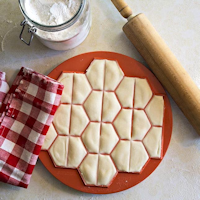
Hunky Bill’s Pierogi Maker (Dumpling)
October 8 is National Pierogi Day. While we really like the little crescent of delicious dough filled with savory, sweet or something in between – making them can be annoying. We found the Hunky Bill’s Big Pierogi Makers about 10 years ago and they are well worth the cabinet shelf space.
If I could only have one, it would be the larger size. Just enough larger to make the stuffing as much the hero as the crispy dough outside. We do have both sizes, but the smaller has only been out of the box a few times. The larger is my go two since it make enough for (two adults) as a hearty side dish for two meals and one meal if it is the entree.
For a lazy “dessert”, use either a pie dough or puff pastry – with any fruit pie filling of your choice, brush with butter and bake or air fry.

Wal-Mart Ain’t Cheap
I cannot be sure which is more amuzing – that Wal-Mart, except for the occassional loss leader, is often not the least expensive place to shop. Or, that with the opportunity to comparison shop offered by the Internet that so many still think it is the best prices.
Goodbye Darth Vador … Lesson Learned

In December of 2018 I purchased the 6.5 qt Ninja Foodi that was christened Darth Vador. I had kinda hoped he would last another 3 months, still the ROI is long past because of the savings in electrical use.
Now about that lesson learned: Most countertop appliances recommend unplugging a device not in use.
And, that is something I usually do since we are prone to brief electrical outages and of course the resulting surge when the power returns. A few weeks ago, while dinner was pressure cooking, we experienced a series of surges and Darth immediately began displaying the signs commonly noted when a Ninja Foodi PC/AF “is gonna die”
Hoping to nurse it along till the end of the year (I do not know why 3 years was important) but no, once it started flashing – in rapid succession “Pot” and the dreaded “err8” it was only a matter of time till the plug unplug replug would not extend its life –
Over the past 33 months, my only regret was not waiting for the 8 qt to be available and so I have been watching this past year for a “good sale”
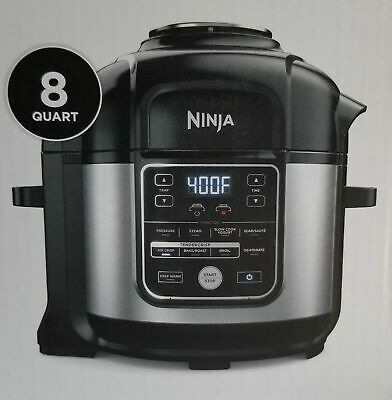
Today, we will be unboxing a brand new Ninja Foodi 8-Qt. 10-in-1 XL Pressure Cooker Air Fryer Multicooker
Why from BJ’s? Several reasons
1. I have made no secret that Ninja Foodi’s unwillingness to provide reasonable product information in timely manner is still annoying. Admittedly it now only takes weeks for simple answers but once burned twice learned.
2. Price – BJ’s price was not only significantly less than anywhere else. EVEN with the purchase of a 3yr extended warranty beats pretty much every other retail outlet by a significant amount of $$. (merchandize plus warranty savings of $50 to $90 US)
Before you ask, The new, single lid model is intriguing, but after several years of “watching” NinjaKitchen roll-outs and reading user experiences over time – more often than not, it is best not to be in the initial wave of Ninja Kitchen purchasers. Darth Vador was from “the second or third batch” and almost everyone I know who purchased at the same time has had longer life.
More importantly The price and the limited warranty combined with NinjaKitchens return/replacement shipping policies are unacceptable to me. If I am going to spend $350 on a countertop appliance, and it goes bad in less than a year – charging me for shipping is unacceptable. Charging me for shipping when something goes bad in less than 60 days with a restocking fee is worse (in my never humble opinion)
We are looking forward to another 3 years of good food, saving $$ on electricity and the slightly larger capabilities offered by that extra 1.5 inches … of cooking space.
Looking forward to sharing more lessons learned here and at: Food Craft – Methods and Making on Gab
either your experiences or ours.
- Pages:
Theme:
Wheat-Red-XEmail Delivery Its All Just String
- Amazon Enjoy The Making
- ASTM
- Carol Hummel
- Craft Industry Alliance
- Deb Robson
- Dr Who Scarf
- Facebook – ItsAllJustString
- FB Group: Braids Beaded Kumihimo & More
- FB Group: Kumihimo Classified
- Find A Yarn Shop By Zip Code
- Hollis Chatelain
- ItsAllJustString.com
- USDA Food Safety
- Yarn Label Reference
- Yvette Stanton-White Threads
Food & Kitchen
- 24Bite
- Amazon All Idea Lists
- Amazon Enjoy The Making
- Atlantic Spice Company
- Central Iowa Norwegians V-3
- Convert Cake To Different Size Pan
- Culinary Math
- EverythingKitchen
- FoodKeeper App
- Hamilton Beach
- Hamilton Beach Manuals
- Instant Cart Referral
- Janet A Zimmerman – Amazon
- Kenzie Swanhart
- Kenzie Swanhart – Amazon
- Mt Mansfield Maple
- Ninja Foodi FD400 Series
- Ninja Kitchens – Amazon
- NinjaKitchens.com
- Urvashi Pitre – Amazon
- Urvashi Pitre – TwoSleevers
- USDA Food Safety
- WestBend Manuals
- Xylitol-Birch Sugar Unsafe
Satisfied Customer
Wheat Wanderings
Space Junky
Affilate/Ambassador Links
In My Small Kitchen
GAB
Recipe Resource
- 24Bite
- Amazon Ingredients
- Breville = The Custom Loaf
- Convert Cake To Different Size Pan
- Culinary Math
- Hamilton Beach Manuals
- KBS-Bread Maker Time-Chart
- Kenzie Swanhart
- Kenzie Swanhart – Amazon
- NF: Chocolate Flan Cake
- Ninja Foodi FD400 Series
- Urvashi Pitre – Amazon
- Urvashi Pitre – TwoSleevers
- WestBend Manuals
- Yeast Types & Subbing
Research Resource
Bread-Making
Ingredient
Recipe In Progress
Genealogy
Meta
-
Wheat Supports: