Ingredients I use often include Amazon Affiliate Links that may benefit me should you purchase thru Amazon.
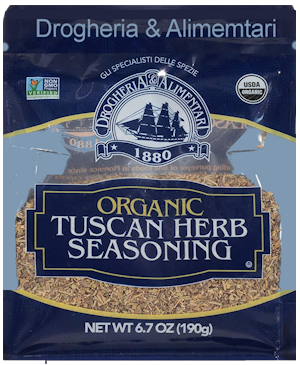
Using Drogeheri and Alimentari Organic Tuscan Herb Seasoning in any recipe calling for Italian Seasoning. Is only the beginning of how it earns it place in the Pantry InMySmallKitchen. I have tried at least three other brands and was not pleased with the final flavour. Still, if there is another you prefer – of course – substitute as needed.
The D&A Tuscan Herb Seasoning contains: Marjoram, Rosemary, Basil, Thyme, Savory, Oregano and Sage. (edited to add) This mix with perhaps one or two other ingredients is found in many recipes – including some of my favorite Eastern European recipes – Ukrainian, Polish, Russian and yes even several German.
For most Italian dishes, it does need Garlic (especially InMySmallKitchen where Garlic is a food group), I keep a container with a 3 parts Tuscan to 1 part Garlic granuals handy to sprinkle anywhere I would use a more garlic forward blend.
When a Greek or Mediterranean Seasoning is needed (like my Gyro Meat) 1/4 tsp each of lemon Zest along with 1/8th tsp of mint is pleasing to most
To make an excellent Sicilian Dipping Sauce Add 1 Tbl Tuscan Blend plus 1 tsp Garlic and 1/2 tsp Red Pepper Flakes and 1/8th tsp Coarse Ground Black Pepper to a pint of an Olive Oil Vinaigrette (2/3 cup Olive Oil to 1/4 cup Wine Vinegar of your choices) It is also our daily go to for Salad dressing or Subs/Wedges too.
Swap the Oil for Mayo of your choice and you have a creamy dressing or dip
Thus far, the Amazon Price has been consistently the best (I check when reordering this size about every 3-4 months.
full disclosure – I remain on FB for about 10 reasons/people and maybe 6 craft or food related groups. Within the past week I received two notices from FB>
The first was about their plan to close “grey accounts” They FORCED this type of account upon those who choose to maintain where possible a separation between business and personal. But okay, not my thing to hide behind screen names. I did however choose to refrain from political commentary on our business page.
Yesterday, I received a notice that my post – it was link to the definition and an explanation of Treason – was censored as violating community standards. When I previously reported person(s) stalking and threatening me and my family – they responded no violation. When I reported a group that persists in sharing trash and seriously incorrect information – no violation of community standards.
So, for those of you relying on MSM sources, you may find it helpful to read the linked blog post. On a personal note, yes, I have blocked/mute chosen not to participate in many of the nearly 50,000 groups on GAB while managing to enjoy those related to my primary social media interests (food, craft, family & friends) It is inevitable that I likely will be shutdown as threatened (not suspended ) so if you like, feel free to find and follow me on GAB or let me know who you are thru their private message system.
I sincerely hope you will take the time to read not only the demands from the Congress, but also the full responses from GAB CEO – Andrew Torba.
I am a customer/user of InstaCart and other grocery delivery services for several years. One thing I have learned is that Instacart and in-store employee shoppers are not mind readers. It has been my experience that IF I take the time to fill in the BOTH the Replacement and PREFERENCE details for each item, it increases my chances for a satisfactory result.
They ain’t fancy, but the following screen shots may help you find where to insert your preferences AFTER ADDing to the Cart and BEFORE you “Submit Order” Once an order has been submitted, it is my experience I can only ADD new items or REMOVE an item and then ONLY I get it done before Shopping Begins. After that, changes must be made thru CHAT.
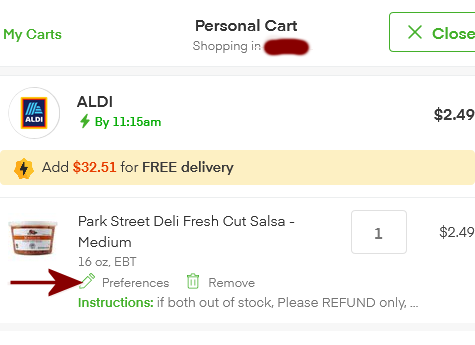
There are seem to be TWO places where you can edit your order and add Replacement & Instructions for each item. The first is when you edit as you order – look for the cart icon followed by a number (that number might be confusing – it is the number of different items, not the quantity you choose) This usually located at the top of the page your right as you look at the screen. This will bring up a list of the items you have ordered and you can then adjust quantity, remove, and Insert YOUR Replacement Preferences AND Instructions
NOTE: this is a screen where it is easiest to adjust quantity – click on the quantity shown and it will allow you to add or subtract as you wish.
When you click on preferences, it brings up the “Your Preferences” Screen – usually with either what you have chosen in the past for replacement and instructions – or you can edit as needed. ALWAYS check the replacement is something you want. Because if you have not completed it before, you might just find some less than happy substitutions.
The good news is that “most of the time” Instacart seems to save the Replacement & Instructions with the product. If it is something you are likely to buy often, be sure to favorite. The bad news is that it is a pain to get back to the cart listing, but less so than if you have to do it from the Checkout Page.
The second opportunity to add your Replacement and Preferences are when you Go To Checkout Although sometimes tedious, I ALWAYS do this step because – well the “APP” can be less than perfect and if I don’t do my part, it will not be the shoppers fault if I don’t get what I want.
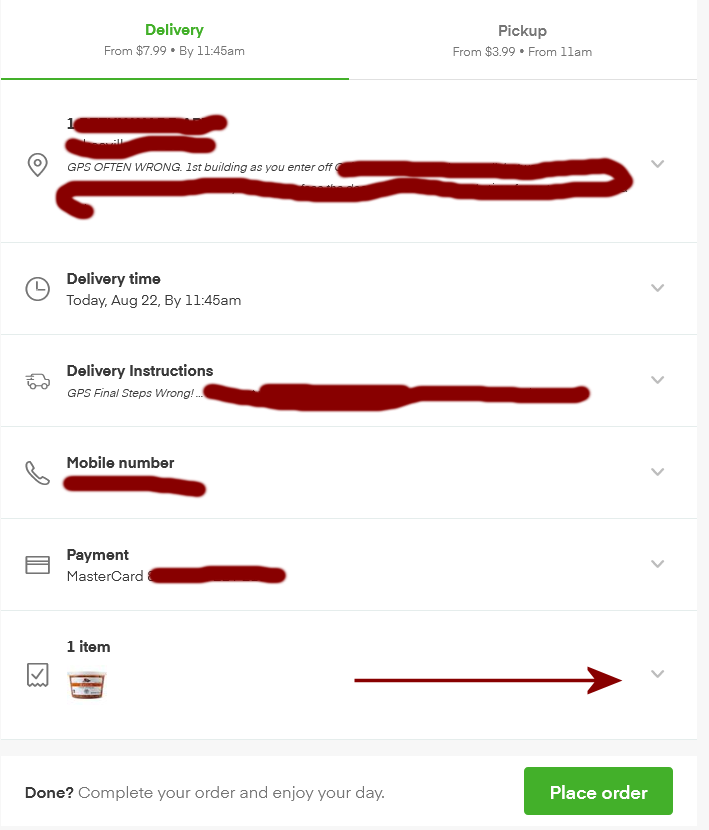
Below is part of the Check Out Page. It is where you can change/add an address, select a different available delivery time frame. Create DETAILED (and mine are) Delivery instructions, Insert a telephone number for the shopper to reach you (I know it says Mobile, but remember, I don’t have one and so it has my landline.) Choose payment options and last but not least Click the down arrow for review and adjust your selection of items, replacement and detailed instruction. Note: It does not seem to be possible to add an item from this page – but that is another blog entry to be done.
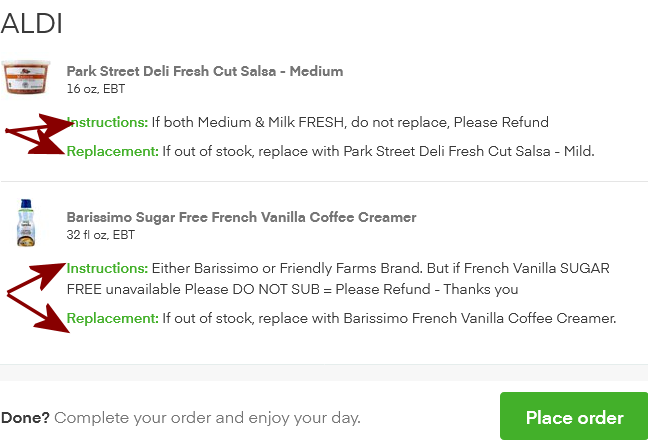
When you select the down arrow for the items, it will bring up your items in a page that looks like this And now comes the really annoyingly tedious and extremely non-intuitive part –
First, I have since fixed the contradictory instructions thanks to one of my favorite shoppers (he has shopped for me at several dozen times)
When you click on either Replacement OR Instructions It takes you to the PRODUCT/ITEM Page you will have to scroll down past all the almost never acceptable “Picked for You” and “Related” Items
Till you get to this one.
TEDIUM = whilst air turns blue as you berate yourself for not checking from Cart page which is slightly less annoying, you will need to go back to the CART page, Go to Check out and then go thru the check out steps (where hopefully InstaCart has “remembered” all the stuff you typed before.
Be sure to check that the section with total, Delivery & Service charges look correct and yes, be sure you have included an appropriate tip according to your means. But tipping is a topic for another day.
Things can change so CAVEAT EMPTOR – this is just what is working for Wheat at this time (22-Aug-2021)
On Topic Comments are always welcomed of find me most often: Facebook Profile: Wheat Carr GAB Profile: Wheat M Carr @wheat GAB group: Food Craft – Making and Methods Other Social Media – almost never, but always using my Real, says so on my birth certificate, name: wheat or Wheat Carr or Wheat M Carr
Although I have posted this link and comment to my small Aldi Aficionado group on Gab, I think I should start sharing some of those short posts here.
I know many people are not ALDI fan, but as a “reader of ingredient labels” My choices are more about nutrition than price (although that helps)
Still the title of this article is also an example of “headlines that annoy me” Spoiler: You Do No Pay To Use The Cart – You pay for the cost of having an employee return it for you.



 This usually located at the top of the page your right as you look at the screen.